A recent question in the newsgroups made me think about how you could hide pages using just the ShapeSheet. The answer to hiding pages is usually a programmatic one, often for good reasons, however I thought I'd have a go at a ShapeSheet only approach as an alternative...
Hiding pages - a one-way street
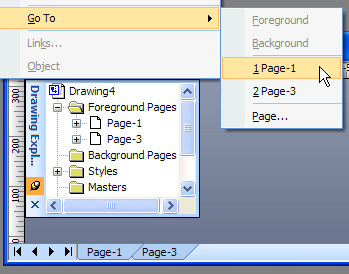
Visio provides a quick way to hide the page from the user interface through its page ShapeSheet cell UIVisibility. The default visible value (0) can be changed to 1 to make the page invisible. This is fine until you realise that UIVisibility really means the entire UI, so no visible page tab, no item in the Drawing Explorer and no option in the Edit / Go To / [page-n] and therefore no way of making it visible again. The effects of hiding Page-2 can be seen below:
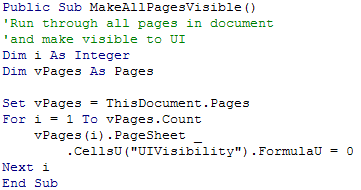
If you do find yourself in the position of having inadvertently hidden a page then you've got three options. First, to save the document in XML format (.vdx) and edit the UIVisibility value in an XML editor such as XML Notepad (somewhat laborious). Secondly, to attack the problem programmatically (useful if you have a lot of pages):
...or thirdly, to use the page navigation shortcut key combination Ctrl + Page Up/Down. This cycles through the pages, irrespective of the UIVisibility setting, enabling you to right-click on the page and, once again, get access to the ShapeSheet to reset the cell. (Note - The shortcut method only works on foreground pages so if you're tackling an invisible background page then you'll have to use either the XML or VBA methods above.)
The latter shortcut key method highlights a number of interesting points about how Visio deals with its pages. It appears that some commands and functions cycle through pages using the respective page's name (a string type), while others use an indexing system. What the UIVisibility cell is doing is changing the availability of the named pages from the Tab collection, the Drawing Explorer, the Edit / Go To menu and Print Preview (which uses Tabs), all of which use the page name. However, other commands, such as Print and Ctrl + Page Up/Down use the indexing system so all of the pages are visible. A final point on pages is that background pages aren't indexed and hence the reason you can't access them via the commands that use this system.
A ShapeSheet solution
Now, given the above information let's see if we can provide a ShapeSheet only method for hiding pages.
In essence my proposed solution is to have each page's UIVisibility cell reference a document user cell that we will always have access to allowing us to 'toggle' selective pages' visibility at will.
Of course there are many ways to tackle this and there's no doubt that a little VBA would add some easier functionality, but here is a walkthrough of the basic ShapeSheet process:
1) Add a User section to your document's ShapeSheet (Shift key + Window / Show ShapeSheet) and a User cell named User.PagesVisibility.
2) Add a new array of, say, ten zeros separated by your language's default separator (for the UK and US this is the semi-colon):
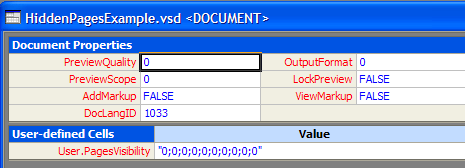
The array represents the document's pages as follows:
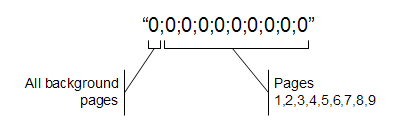
3) Right-click each page to show its ShapeSheet and add the following formula to the UIVisibility cell:
=INDEX(PAGENUMBER(),TheDoc!User.PagesVisibility,,0)
You should now be able edit the array of values in the document ShapeSheet, toggling between 0 and 1 and the corresponding page's visibility will be altered in unison.
Breaking down what's happening
Let's look at what the above formula is doing. The INDEX ShapeSheet function takes four parameters: a list index, the list itself, the list separator and a value that's returned if there is an error.
- The list index - For the index, I'm using the PAGENUMBER function. For background pages this will always return zero due to their being non-indexed, while for foreground pages this will return the page number as expected. Note that the Index function is zero based (that is, the first item is 0, the second is 1 etc.) hence I'm using the first element in the array to represent all background pages.
- The list - Here, I'm just pointing the formula to the list that we added earlier in the document's ShapeSheet User cell: User.PageVisibility.
- The list separator - This can be left blank if you are using the default type, as we are here, otherwise you can use whatever you like to delimit the list.
- The error value - I'm using is zero here as, if for any reason, the function produces an error, its result will always be 0 and this will mean that the page will be left in a visible state.
Taking it a bit further
Although this is an attempt to just rely on the ShapeSheet, a bit of VBA would certainly make life a little easier particularly for documents with large numbers of pages. Perhaps I'll leave that to another post...[Update - Hiding pages with VBA]
An example document demonstrating the above method can be downloaded here: Download HidingPagesExample.vsd.